

Every business invests time and money into generating leads through websites, social media, paid ads, webinars, and email campaigns. Yet many companies unknowingly lose potential customers because their lead management process relies on manual tasks and delayed follow-ups.
When a prospect submits a form or requests information, every minute matters. If your team takes hours or even days to respond, competitors may already be engaging with that lead.
This is where Zapier lead generation automation becomes a powerful growth tool.
By connecting your marketing, sales, and customer management systems, Zapier enables businesses to automatically capture, qualify, route, and nurture leads in real time. Instead of manually moving data between tools, your entire lead generation process runs on autopilot.
What Is Lead Generation?

Lead generation is the process of attracting potential customers and encouraging them to share their contact information or express interest in your business. Whether someone downloads an e-book, subscribes to a newsletter, registers for a webinar, or fills out a contact form, they are taking a step from visitor to potential customer.
The goal isn’t just to drive traffic; it’s to build a pipeline of qualified prospects who are more likely to convert into paying customers. Unlike general marketing, lead generation focuses on creating a direct connection with interested individuals so you can continue engaging with them beyond their initial visit.
Successful lead generation starts with offering genuine value. When businesses provide useful content, exclusive resources, or relevant solutions, prospects are far more willing to share their information and begin a relationship that can eventually lead to a sale.
Why Businesses Need Lead Generation Automation?
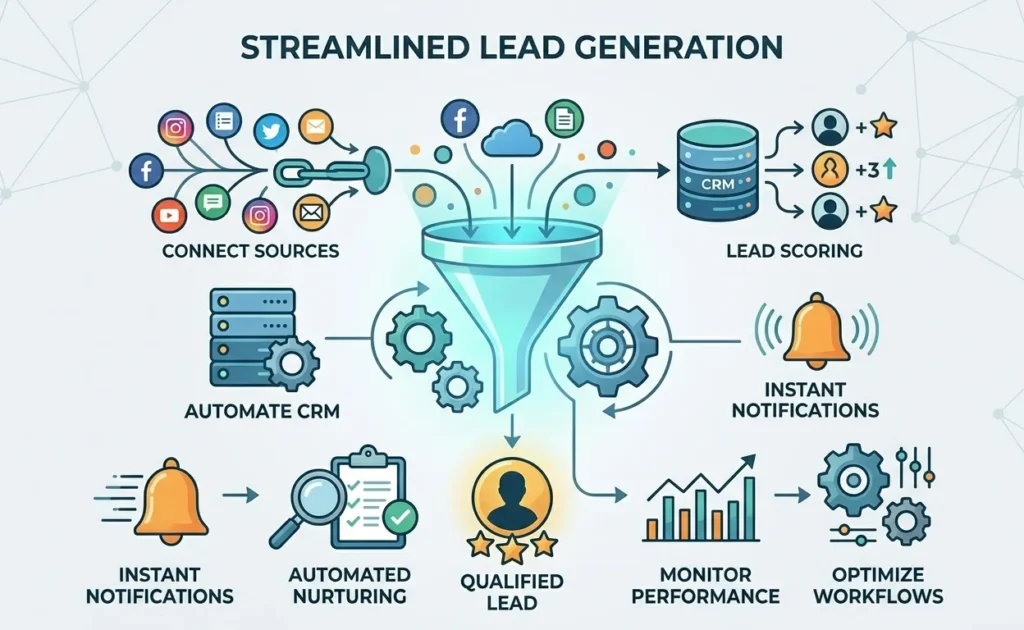
Many organizations still rely on manual lead management processes.
A typical workflow often looks like this:
- Prospect submits a form.
- Team receives an email notification.
- Data is manually entered into CRM.
- Sales team is informed.
- Follow-up occurs hours later.
This process creates several problems:
- Delayed responses
- Human errors
- Missed opportunities
- Duplicate records
- Poor lead qualification
Automation removes these bottlenecks and ensures every lead receives immediate attention.
Step 1: Set Up Your Zapier Account
Getting started with Zapier is simple.
Create Your Account
- Visit Zapier.com
- Sign up using email or Google account
- Verify your email address
- Complete the onboarding process
Configure Basic Settings
Before building automations:
- Set your preferred timezone
- Enable two-factor authentication
- Review privacy settings
- Connect your primary business applications
This creates a secure foundation for future workflows.
Step 2: Choose the Right Zapier Plan
The best plan depends on your lead volume and automation requirements.
| Plan | Price | Best For | Key Features |
|---|---|---|---|
| Free | $0/month | Small businesses, testing workflows, basic automation | Zapier automation platform, Unlimited Zaps/Tables/Interfaces, Two-step Zaps, Zapier Copilot, limited monthly tasks (100 tasks/month) |
| Professional | Starting at $29.99/month | Growing businesses, CRM usage, advanced automation needs | Everything in Free + Multi-step Zaps, Unlimited Premium apps, Webhooks, Email & live chat support, AI fields, Conditional logic (form logic) |
| Team | Starting at $103.50/month | Teams collaborating on automation systems | Everything in Professional + 25 users, Shared Zaps & folders, Shared app connections, SAML SSO, Premier support |
| Enterprise | Custom pricing (Contact Sales) | Large organizations, enterprise-scale automation | Everything in Team + Unlimited users, advanced admin controls, enterprise-grade security, dedicated account/technical manager |
Step 3: Connect Your Lead Generation Stack
The next step is connecting your essential business tools.
Website Forms
Connect:
- Typeform
- Google Forms
- Jotform
- Gravity Forms
- Elementor Forms
CRM Platforms
Integrate:
- HubSpot
- Salesforce
- Pipedrive
- Zoho CRM
Email Marketing Platforms
Connect:
- Mailchimp
- ActiveCampaign
- ConvertKit
- Klaviyo
Team Communication Tools
Add:
- Slack
- Microsoft Teams
- Discord
Once connected, Zapier can move lead information instantly between platforms.
Step 4: Build Your First Lead Capture Workflow
A simple lead capture Zap is the foundation of automation.
Example Workflow
Trigger:
New website form submission
Actions:
- Create contact in HubSpot
- Add lead to Google Sheets
- Send Slack notification
- Trigger welcome email
Benefits
- Immediate lead capture
- Centralized data storage
- Faster sales response
- Better lead visibility
Every lead enters your system automatically without manual intervention.
Step 5: Automate Facebook Lead Ads
Facebook Lead Ads are one of the most effective sources of inbound leads.
How to Automate Facebook Leads
Trigger:
New Facebook Lead Ad submission
Actions:
- Create CRM contact
- Assign lead owner
- Send sales notification
- Add lead to email sequence
Example Zap
Facebook Lead Ad → HubSpot Contact → Slack Notification → Welcome Email
This ensures prospects receive immediate engagement after submitting their information.
Step 6: Automate LinkedIn Lead Generation
For B2B companies, LinkedIn remains one of the highest-quality lead sources.
LinkedIn Automation Workflow
Trigger:
New LinkedIn Lead Form submission
Actions:
- Create CRM contact
- Enrich lead data
- Assign sales representative
- Start nurturing sequence
Benefits
- Higher-quality leads
- Better targeting
- Faster qualification
- Improved sales efficiency
LinkedIn automation helps move prospects into your pipeline without manual work.
Step 7: Use PhantomBuster for Advanced Lead Extraction
PhantomBuster enhances lead generation by extracting prospect information from social platforms.
What PhantomBuster Can Do?
- Extract LinkedIn profiles
- Collect company information
- Gather prospect data
- Build targeted lead lists
Example Workflow
PhantomBuster → Zapier → Google Sheets → HubSpot CRM
This process automatically turns social media data into actionable sales opportunities.
Step 8: Implement Lead Qualification and Scoring
Not every lead deserves the same level of attention. Lead scoring helps prioritize prospects based on quality and buying intent.
Example Criteria
Assign points based on:
- Job title
- Company size
- Industry
- Website activity
- Form responses
Automated Workflow
New Lead → Score Lead → Assign Priority → Route to Sales
High-value leads receive immediate attention while lower-priority prospects enter nurture campaigns.
Step 9: Automate Lead Nurturing
| Day | Action |
| Day 1 | Welcome email |
| Day 3 | Educational content |
| Day 7 | Case study |
| Day 14 | Product demonstration invitation |
| Day 21 | Sales consultation offer |
Step 10: Optimize and Monitor Performance
Automation is not a one-time setup—it should be continuously refined to improve results and maximize ROI. To ensure your system performs effectively, track the following key metrics:
- Lead Response Time
Measure how quickly a lead receives their first interaction after entering your system. - Conversion Rate
Track the percentage of leads that turn into paying customers. - Lead Source Performance
Identify which channels consistently generate high-quality prospects. - Sales Velocity
Measure how fast leads progress through each stage of your sales pipeline. - Automation Success Rate
Monitor failed tasks, errors, and workflow breakdowns to maintain reliability.
Regular analysis and optimization of these metrics ensure your automation system stays efficient, scalable, and consistently improves lead quality over time.
Common Zapier Automation Mistakes to Avoid
- Overcomplicated workflows – Keep automations simple and easy to scale.
- Poor data mapping – Make sure all fields are correctly matched between apps.
- Ignoring error notifications – Regularly check Zap history for issues.
- Missing lead qualification – Don’t treat every lead the same; filter properly.
- Lack of testing – Always test your Zaps before going live.
Best Practices for Zero-Leak Lead Generation
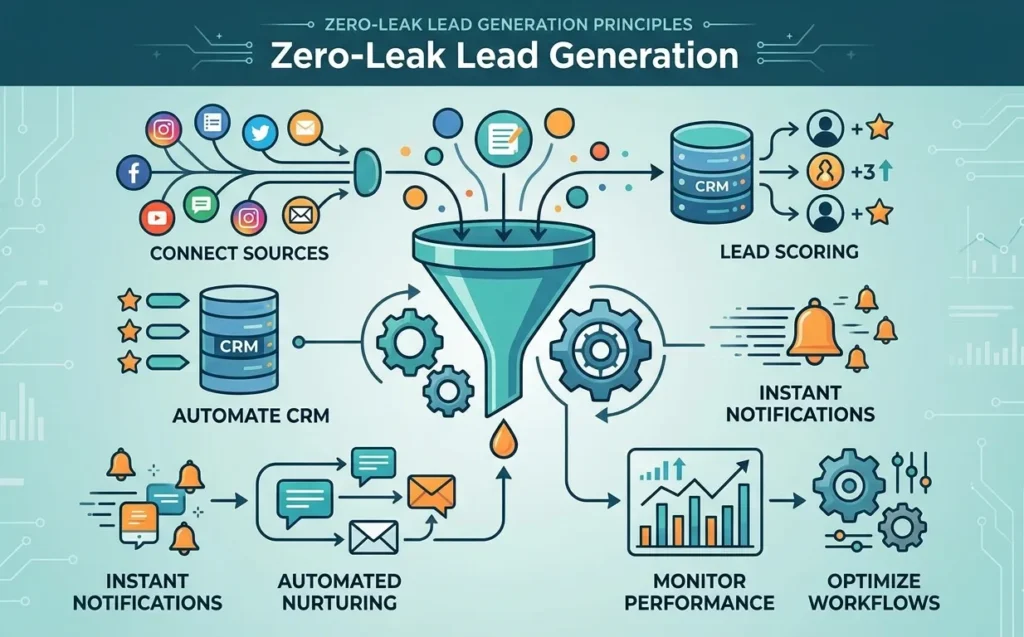
To maximize results:
- Connect every lead source
- Automate CRM updates
- Implement lead scoring
- Use instant notifications
- Create automated nurturing sequences
- Monitor performance regularly
- Optimize workflows continuously
These practices ensure every lead receives proper attention throughout the buyer journey.
Final Thoughts
Lead generation is no longer just about attracting prospects—it’s about responding faster, qualifying smarter, and nurturing consistently. Zapier allows businesses to create a fully automated lead-generation system that captures every opportunity, reduces manual work, and increases revenue without adding operational complexity.
Whether you’re collecting leads from website forms, Facebook Lead Ads, LinkedIn campaigns, or social media prospecting tools like PhantomBuster, Zapier can connect your entire tech stack into one seamless workflow.
At Techelix, we build intelligent lead generation systems for businesses. We use tools like Zapier, HubSpot, CRM platforms, and AI-powered lead scoring. If your business is losing leads due to slow follow-ups or weak tracking, automation is the fix. Explore our Zapier lead management services to streamline your funnel and convert more leads into paying customers.