

A quick response to verbal phrases from intelligent devices is expected today. The user speaks some phrases, and then the device wakes up and starts working. But what most of the users fail to recognize is the fact that there is a machine learning algorithm running all the time in the background and checking if those few words were actually spoken by the user. This approach is called wake word detection or keyword spotting (KWS).
But now the interesting engineering problem arises: how the device should continuously listen but not upload microphone audio streams to the cloud, and at the same time, it should be done while using low amounts of computational power, RAM and battery power. Otherwise, false awakenings, false negatives, delays, and excessive energy consumption can occur.
On-device keyword spotting can help in resolving this problem by transferring the first stage of voice detection to the device itself. There is no need to transfer the ambient audio stream to the server to find out if the wake phrase was spoken by the user; a local lightweight model does this job all by itself. This way voice recognition architecture is designed with one concept in mind: make the always-on part
What Is Wake Word Detection?
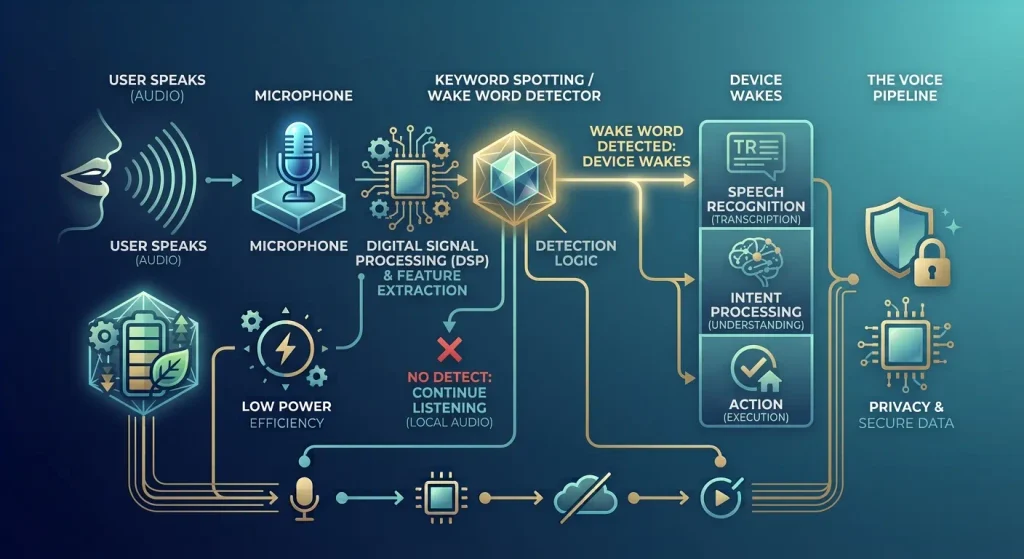
The technique of detecting wake words involves analysis of an audio stream to check whether that specific word or phrase is spoken. As seen earlier, some instances of wake word detection involved voice assistants able to detect phrases such as “Hey Siri” or “Alexa.” This could also be applicable to a wide range of other gadgets and technologies. In this case, a firm can design a custom wake word detector for any smart device, wearables, car, industry tool, smartphone applications, and so on.
What should be noted is that the purpose of wake word detection differs from speech recognition systems. While a device is designed to react to a certain phrase, the model simply has to answer the question:
“Did I just hear the phrase I am looking for?”
If the answer is no, the audio can remain local and the system can continue listening. If the answer is yes, the device can activate the next stage of the voice pipeline.
A typical architecture therefore looks something like this:
Microphone → Audio processing → Keyword spotting → Wake word detected → Speech recognition → Intent processing → Action
This separation is important because the first stage needs to run continuously, while later stages can be activated only when necessary.
Why On-Device Keyword Spotting Matters
In the cloud approach to voice interaction, it could be much simpler to just transmit microphone audio stream to the cloud service and let the larger speech engine residing in it detect whether the wake-word has been detected. However, even though technically feasible, it will lead to numerous problems from the architecture standpoint.
At this point, the detection becomes impossible without an internet connection, the background noise should be sent out of the device, the network latency becomes a part of the experience, and, what is worse, the cloud service receives audio streams that are not even supposed to be analyzed.
The local determination capability provides the opportunity to continue tracking the sound data without the need to transmit all the microphone data to the remote server every minute. The advantage of the solution lies in the fact that it provides better opportunities for ensuring privacy as voice processing is performed locally which means that the audio data stays within the device in the initial stage.
In addition, it allows improving the responsiveness of the device as there is no need to send a request to the server for every single phrase.
The Battery Challenge Behind “Always Listening”
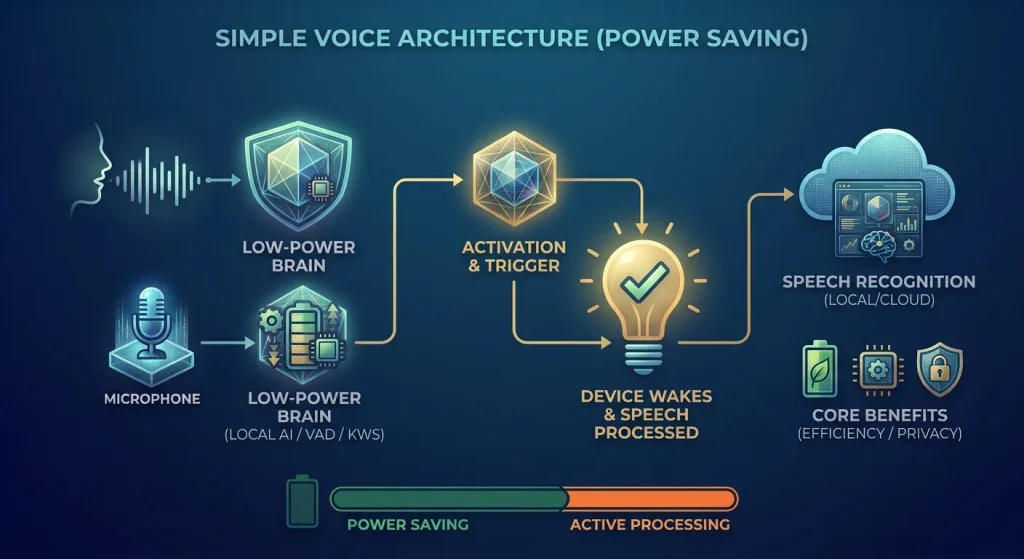
The phrase “always listening” makes voice interaction sound simple, but continuous listening is an engineering problem. A device such as a smartwatch, earbud, smart speaker, or embedded controller may spend hours or even days waiting for someone to say its wake phrase. Running a large speech recognition model continuously would be wasteful, especially on hardware with limited compute and battery capacity.
This is why wake word detection generally uses a much smaller model than full speech recognition.
Google Research has described cascade approaches specifically for mobile devices, combining a small computational footprint with specialized low-power processing to continuously listen for keywords. TensorFlow has similarly documented always-on wake word detection designed for resource-constrained edge hardware.
The architecture can be thought of as two different operating modes.
- Low-power mode:
The device continuously runs a compact keyword spotting pipeline. - Active mode:
Once the wake word is detected, the device activates more computationally expensive speech recognition and downstream processing.
That separation is one of the most important ideas behind practical voice interfaces.
Instead of paying the computational cost of full speech recognition every second, the product spends very little energy waiting and significantly more only when an interaction actually begins.
How On-Device Wake Word Detection Works
At a high level, the process begins with the microphone capturing short segments of audio. The system then transforms those signals into a representation that the model can process efficiently.
The model does not need to understand the entire conversation. It is looking for patterns associated with the target phrase.
A simplified pipeline looks like this:
Microphone input
↓
Audio buffering
↓
Preprocessing and feature extraction
↓
Keyword spotting model
↓
Confidence estimation
↓
Threshold / decision logic
↓
Wake word trigger
↓
Full speech recognition
The individual stages can vary significantly depending on the hardware and model architecture, but the basic idea remains the same.
False Accepts and False Rejects: The Core Accuracy Problem
Wake word detection does not just boil down to how accurately the process works. There are two kinds of errors that play an important role in the practical implementation of the system. A false accept error happens when the device responds, but the user hasn’t said the wake word. A false reject error happens when the user has said the wake word, but the device does not respond.
These errors impact the user experience differently. Consider a scenario where a smart speaker activates every time people conduct a regular conversation. Even if the system has amazing accuracy levels in tests, it will soon lose users’ confidence. At the same time, the user will get frustrated with a device which will barely activate even when he or she uses the wake word repeatedly.
Google Research specifically identifies false accepts and false rejects as important problems for on-device keyword spotting because resource constraints can affect the quality of detection. This is why wake word engineering focuses heavily on operating thresholds and real-world testing, not just model accuracy.
Training a Custom Wake Word Model
Custom wake words are especially useful when a product needs a branded or application-specific voice trigger. Instead of relying on a generic phrase, a company can train the device to recognize a name or command that fits its product. However, building a reliable model takes more than collecting a handful of recordings of the wake word. The training data needs to reflect the different conditions the device is likely to encounter in everyday use.
The positive training data should include variations in speakers, accents, speaking speeds, volume levels, microphones, and acoustic environments. At the same time, the model needs enough negative examples to learn what it should ignore. These can include everyday conversations, unrelated words and phrases, background noise, and sounds that are acoustically similar to the target wake word.
For example, Edge Impulse’s keyword spotting workflow uses unknown words and background noise alongside audio feature extraction and transfer learning to help build compact models suitable for embedded devices.
The key is to treat the dataset as a representation of the real environment, not simply a collection of correct wake-word recordings. A strong model needs to learn both what the wake word sounds like and what it should ignore. In practice, that second part can be just as important as the first because poor negative training data can lead to unnecessary false activations.
Model Optimization for Low-Power Devices
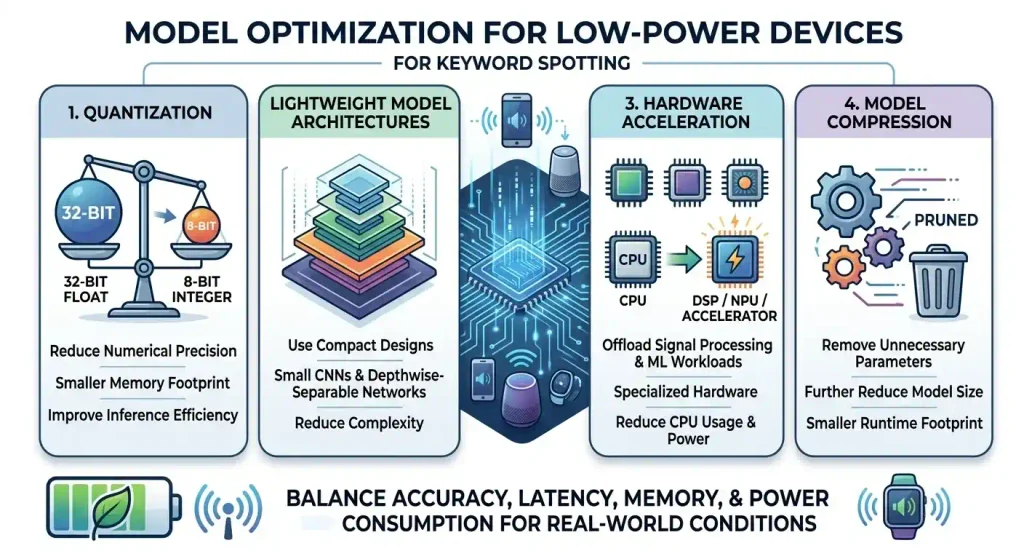
A keyword spotting model that performs well during development still needs to be optimized for the hardware on which it will run. This is particularly important for always-on devices, where even small inefficiencies can accumulate over hours or days of continuous operation.
The optimization process typically focuses on reducing the model’s memory footprint and computational requirements without significantly affecting detection quality. Several techniques can help achieve this balance.
1. Quantization
Quantization reduces the numerical precision used to represent model weights and perform computations. Converting a model from higher-precision floating-point representations to lower-precision formats can reduce memory usage and, on compatible hardware, improve inference efficiency.
For wake word detection, these savings are particularly valuable because the model may remain active continuously. A smaller and more efficient model can reduce the computational and energy cost of the always-on detection stage.
2. Lightweight Model Architectures
Wake word detection does not require the same model complexity as full speech recognition or conversational AI. Its task is much narrower: identify whether a specific word or phrase is present in the incoming audio.
This makes compact architectures such as small convolutional neural networks, depthwise-separable networks, and other efficient model designs suitable for resource-constrained devices. The appropriate architecture depends on the target hardware, required accuracy, latency requirements, and available memory.
3. Hardware Acceleration
Many modern embedded devices include specialized hardware such as digital signal processors (DSPs), neural processing units (NPUs), or other accelerators designed to handle signal processing and machine-learning workloads efficiently.
Using these capabilities can reduce the amount of work performed by the general-purpose CPU and improve the efficiency of continuous inference. For battery-powered devices, this can help reduce the energy required to keep the wake word detector running.
4. Model Compression
Model compression techniques can further reduce the storage and runtime footprint of a trained model. Depending on the architecture and deployment environment, this may involve reducing unnecessary parameters or applying other techniques that make the model smaller and more efficient.
The goal is not simply to create the smallest possible model. A production-ready wake word detector needs to balance detection accuracy, latency, memory usage, and power consumption while remaining reliable in real-world conditions.
Wake Word Detection vs. Speech Recognition
Wake word detection is often confused with speech recognition because both technologies process human speech. They serve different purposes, however.
| Wake Word Detection | Speech Recognition |
| Detects a predefined word or phrase | Converts broader speech into text |
| Usually runs continuously | Usually runs after activation |
| Designed for low-power inference | Can require considerably more compute |
| Produces a detection decision/confidence | Produces a transcript |
| Focuses on one or a small number of phrases | Handles much broader language |
| Commonly deployed at the edge | Can run on-device, at the edge, or in the cloud |
A useful way to think about the relationship is:
The Wake Word Detection stage is used to indicate whether the voice-based interface is ready to process the voice command from a user. The Speech Recognition part is used to determine what exactly the user asked about. Thus, for products that require extended voice functionality, the Wake Word Detection stage can serve as an entrance gate to the more complicated Speech Recognition pipeline.
There might be cases where the Speech Recognition stage needs special knowledge related to a particular domain in order to be able to understand correctly what the user wanted to say.
Designing for Privacy Without Overpromising
The use of keyword spotting directly on the device may result in less need to continuously upload ambient sound recordings to a cloud-based server. However, privacy needs to be thought of in terms of the whole voice structure. In the case where a device is able to detect a wake word locally, but record everything afterwards in the cloud indefinitely, then privacy has not been addressed.
A privacy-conscious design should consider the entire data flow:
Microphone → Local detection → Activation → Speech processing → Storage → Deletion
At each stage, product teams should ask:
- Does the audio leave the device?
- When does recording actually begin?
- Is activated audio stored?
- How long is it retained?
- Is it encrypted?
- Who can access it?
- Can users delete their recordings?
- What happens after an accidental activation?
On-device processing is therefore best viewed as one part of a privacy-by-design architecture, rather than a complete privacy solution by itself.
Conclusion
The idea of wake word detection might appear simple enough; however, there lies the optimized machine learning pipeline that listens to you all the time without wasting energy and triggering falsely. Keyword spotting on-device performs the preliminary task, cutting down on reliance on the cloud. To ensure voice activation works properly in production, there should be audio processing, good training data, threshold optimization, and model optimization.