

As teams scale, simple automations in Zapier or Make often become expensive, rigid, and hard-to-manage systems. What once felt fast and easy slowly becomes a web of dependencies that’s difficult to control and costly to run. That’s where n8n comes in.
n8n offers greater flexibility, deeper control over logic, and a scalable automation infrastructure that teams can own, especially for API-heavy, AI-driven, or high-volume workflows. However, migration is the real challenge. Moving live workflows, webhooks, and critical automations isn’t just a tool switch; it’s a structured engineering process that must avoid downtime and data loss.
This guide breaks the migration into clear, practical steps so you can move from Zapier/Make to n8n safely, systematically, and with full control over your automation stack.
Step-by-Step Transition to n8n
The following steps will help you audit, rebuild, test, and transition your automations from Zapier or Make to n8n safely and systematically.
Step 1: Audit Existing Zapier Zaps
Before migrating a single workflow, perform a full automation audit. The goal is not just to list your Zaps; it is to understand how your business operations currently depend on them.

Start by exporting or documenting every active Zap from your Zapier dashboard. Include workflows across all departments: sales, support, marketing, finance, operations, and internal tooling. Many businesses discover hidden dependencies only after migration begins, so this discovery phase is critical.
Review each Zap’s structure carefully:
- trigger events
- action sequences
- filters and paths
- formatter utilities
- webhook dependencies
- custom JavaScript in “Code by Zapier”
- connected APIs
- task usage patterns
- failure history
The Zap history tab is especially useful because it reveals:
- workflows with high failure rates
- unstable integrations
- slow execution chains
- API bottlenecks
- workflows consuming the most monthly tasks
This data helps prioritise migration order.
Recommended Migration Priority
| Migrate First | Migrate Later |
| Internal notifications | payment processing |
| Reporting automations | CRM write operations |
| Slack alerts | invoicing systems |
| Low-risk sync workflows | customer-facing automations |
Key Items to Record for Every Zap
| Trigger Type | Webhook, polling, schedule, app event |
| Action Count | Number of steps and branching paths |
| Connected Apps | Verify n8n node availability |
| Formatter Usage | Text parsing, dates, number formatting |
| Custom Code | JavaScript logic or API transformations |
| Webhook URLs | External dependencies that must be updated |
| Monthly Task Volume | Helps estimate infrastructure requirements |
| Error Rates | Identify unstable workflows |
| Execution Time | Detect performance bottlenecks |
| Dependencies | Other Zaps or services relying on outputs |
Pro Tip: Build a Migration Matrix
Create a spreadsheet with:
- Workflow name.
- Business owner.
- Complexity score.
- Migration status.
- Testing status.
- Rollback readiness.
This becomes your operational migration dashboard throughout the project.
Step 2: Set Up n8n (Self-Hosted or Cloud)
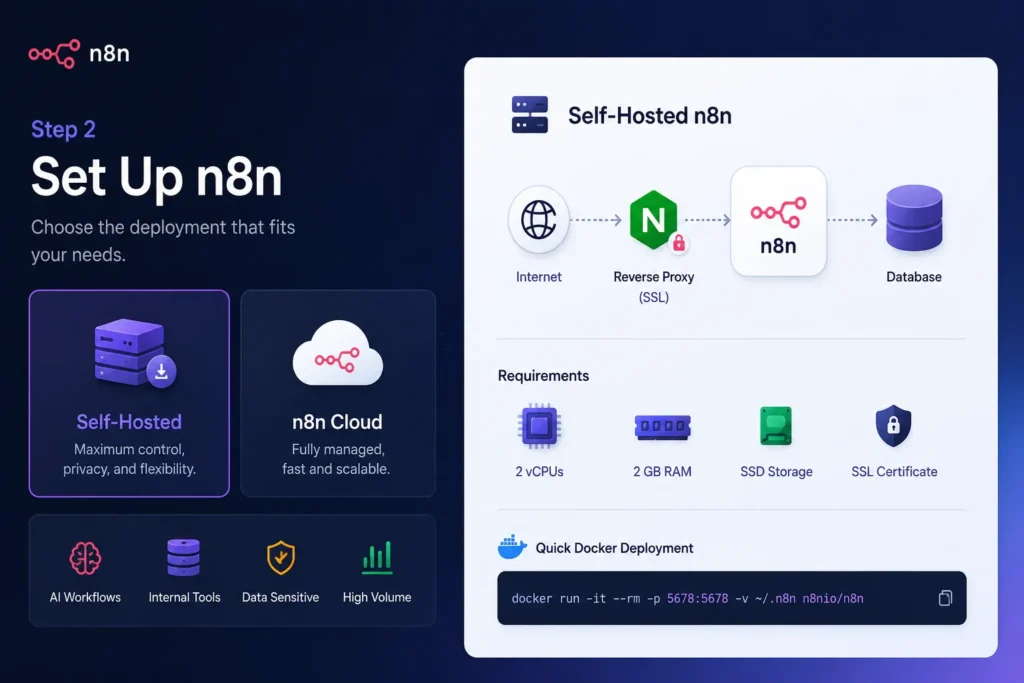
Once your audit is complete, prepare the new automation environment.
n8n offers two deployment models:
- Self-hosted infrastructure
- Managed n8n Cloud
The right choice depends on:
- Technical resources.
- Compliance requirements.
- Workflow volume.
- Scalability needs.
- Infrastructure control.
Option 1: Self-Hosted n8n
Self-hosting is ideal for:
- High-volume automations.
- AI workflows.
- Internal tooling.
- Data-sensitive operations.
- Companies want predictable costs.
Common deployment methods:
- Docker
- Docker Compose
- Kubernetes
- VPS installations
- cloud VM instances
Minimum recommended production setup:
- 2 vCPUs
- 2 GB RAM
- SSD storage
- reverse proxy (Nginx or Traefik)
- SSL certificate
Quick Docker Deployment
docker run -d \--name n8n \-p 5678:5678 \-v n8n_data:/home/node/.n8n \n8nio/n8n
For production environments, Docker Compose is strongly recommended because it simplifies:
- Persistence.
- Backups.
- Scaling.
- Environment variables.
- Database integration.
Recommended Production Additions
1: Add PostgreSQL
Avoid SQLite for larger workflows.
2: Configure SSL
Use HTTPS immediately for webhook security.
3: Set Environment Variables
Store:
- Encryption keys.
- API tokens.
- SMTP configs.
- Database credentials.
4: Enable Backups
Backup:
- Workflows.
- Credentials.
- Execution logs.
- Environment configs.
Option 2: n8n Cloud
n8n Cloud is ideal for:
- Faster onboarding
- Smaller teams
- Non-DevOps environments
- Teams avoiding infrastructure management
As of 2026, the Starter plan starts at around $20/month and includes 2,500 executions per month.
Unlike Zapier’s task-based scaling model, self-hosted n8n eliminates per-task pricing entirely, making it significantly more cost-efficient at scale.
Step 3: Map Zapier Triggers to n8n Equivalents
The next step is workflow translation.
Most Zapier triggers have direct equivalents inside n8n’s node ecosystem. n8n 1.x supports:
- 400+ native integrations
- HTTP/API-based workflows
- custom community nodes
- webhook-first architecture
Instead of rebuilding blindly, map every Zapier component to its n8n replacement before creating workflows.
Common Trigger Mappings
| Webhooks by Zapier | Webhook Node |
| Schedule by Zapier | Cron Node |
| Gmail New Email | Gmail Trigger |
| Google Sheets New Row | Google Sheets Trigger |
| Slack New Message | Slack Trigger |
| RSS Feed | RSS Read Node |
| Custom API Polling | HTTP Request + Cron |
| Formatter Utilities | Set, Code, Function, Expressions |
Understand the Architectural Difference
Zapier
Linear workflow model:
Trigger → Action → Action → Action
n8n
Node orchestration model:
Trigger ├── Validation ├── Enrichment ├── AI Processing └── Notifications
This makes n8n dramatically more flexible for:
- branching logic
- AI agents
- multi-path workflows
- parallel execution
- reusable subflows
Important Webhook Migration Considerations
Webhook migrations require special care because they interact with live production systems. Never replace webhook endpoints immediately.
Instead:
- Create the new n8n webhook.
- Test internally.
- Run both systems in parallel.
- Compare payload outputs.
- Gradually switch traffic.
This prevents downtime and data loss.
Step 4: Rebuild Workflows in n8n
Once triggers are mapped, begin rebuilding workflows inside n8n’s visual canvas. Unlike Zapier’s step-by-step flow builder, n8n uses a node-based architecture that allows workflows to branch, merge, loop, and execute conditionally.
This is where migrations often become workflow upgrades rather than simple recreations.
Core Differences Between Zapier and n8n
Conditional Logic
Zapier Paths are relatively limited.
n8n supports:
- IF nodes.
- Switch nodes.
- Nested branching.
- Dynamic expressions.
- Multi-condition routing.
Example:
{{$json.lead_score > 80 && $json.company_size > 20}}
Looping & Iteration
Zapier struggles with large arrays and repeated processing.
n8n handles this using:
- SplitInBatches.
- Item Lists.
- Looping patterns.
- Merge nodes.
This is especially useful for:
- Bulk CRM updates.
- Inventory syncs.
- AI batch processing.
- Multi-record enrichment.
Code Execution
n8n replaces “Code by Zapier” with a much more powerful execution environment.
Supported languages:
- JavaScript
- Python (n8n 1.x)
This enables:
- Custom API handling
- Advanced transformations
- AI prompt formatting
- Data normalization
- Complex calculations
Error Handling & Recovery
n8n provides production-grade resilience features:
- retry configuration
- try/catch workflows
- error triggers
- fallback paths
- execution logging
- dead-letter handling
This is critical for business-critical automations.
Step 5: Migrate Authentication Credentials Securely
Credentials are among the most overlooked aspects of migration.
Do not copy workflows until authentication systems are properly prepared. n8n stores credentials separately from workflows and encrypts them at rest.
Supported authentication types include:
- OAuth2.
- API Key.
- Basic Auth.
- Bearer Tokens.
- Header Authentication.
- Custom credential types.
Best Practice Workflow
Step 1
Create credentials first.
Step 2
Name them consistently:
prod_hubspot_apiprod_slack_botstaging_openai_key
Step 3
Use environment variables for sensitive secrets.
Step 4
Restrict access using role-based permissions.
Security Recommendations
Never:
- Hardcode tokens.
- Expose webhook secrets publicly.
- Reuse staging credentials in production.
Always:
- Rotate keys regularly.
- Monitor failed authentications.
- Separate dev/staging/prod environments.
Step 6: Test and Validate Thoroughly
Testing is where stable migrations are won or lost. Before disabling any Zap:
- Run test payloads.
- Compare outputs.
- Validate field mappings.
- Simulate failures.
- Inspect execution logs.
n8n’s execution viewer is much more transparent than Zapier’s, as every node clearly shows its inputs, outputs, execution time, transformation logic, and error traces in one place. This makes debugging workflows and understanding data flow significantly easier.
Validation Checklist
1: Functional Validation
- correct data mapping
- proper field formatting
- expected branching behavior
- webhook delivery success
2: Reliability Testing
- Retry behavior.
- Timeout handling.
- Invalid payload processing.
- Duplicate event prevention.
3: Scheduling Validation
- Timezone accuracy.
- Cron intervals.
- Delayed execution timing.
4: Parallel Testing Strategy
Run Zapier and n8n simultaneously for several days.
Compare:
- Outputs.
- Timestamps.
- API behaviour.
- Error frequency.
This dramatically reduces migration risk.
Step 7: Cutover and Decommission
Once workflows are validated, begin phased cutover. Avoid “big bang” migrations. Instead, migrate incrementally.
Recommended Cutover Process
Phase 1 — Parallel Running
Keep:
- Zapier active
- n8n active
Compare outputs continuously.
Phase 2 — Traffic Shift
Gradually reroute:
- Webhooks.
- Scheduled tasks.
- App triggers.
to n8n.
Phase 3 — Monitoring Window
Monitor for:
- Execution failures.
- Duplicates.
- Latency spikes.
- API rate limits.
- Authentication issues.
Maintain rollback capability for at least 30 days.
Do NOT Immediately Delete Zaps
Pause them instead. This provides:
- Rollback safety.
- Historical reference.
- Debugging comparison.
- Emergency recovery.
n8n 1.x Features That Simplify Migration
Modern n8n releases significantly reduce migration complexity.
1: Improved Node UI
The redesigned interface improves:
- field mapping
- expression building
- debugging
- data previews
2: Debug Mode
Step-through execution allows:
- node-by-node testing
- isolated debugging
- rapid iteration
without running the entire workflow.
3: Community Node Ecosystem
n8n now supports 200+ community nodes for:
- niche SaaS apps
- custom APIs
- internal tooling
- specialized integrations
This closes many integration gaps previously handled by Zapier.
4: Native AI Workflow Support
n8n includes native AI nodes for:
- OpenAI
- Anthropic
- Gemini
- vector databases
- AI chains
- agentic workflows
This makes n8n especially valuable for AI-powered automation stacks in 2026.
5: Execution Pinning
Pin test payloads directly to nodes so downstream logic can be tested repeatedly without re-triggering upstream systems.
This saves enormous debugging time during migrations.
Final Thoughts:
Moving from Zapier or Make to n8n is less about switching tools and more about upgrading control. When you approach it step by step, auditing workflows, mapping logic, rebuilding carefully, and testing in parallel, you avoid downtime and unlock a far more scalable automation system.
The real win isn’t just lower cost or more features. It’s owning your workflows end-to-end and building automation that can actually grow with your business. For teams looking to simplify the process, a professional n8n migration service can help accelerate deployment, reduce migration risks, and ensure every workflow is rebuilt for long-term scalability.