

As companies grow and the employment rate rises, the pressure on finance teams is increasing more than ever before. In many organizations, Accounts Payable still runs on manual work, email chains, spreadsheets, and paper-based approvals. The result? Slow processing, frequent errors, delayed payments, and rising operational costs.
A single invoice processing often passes through several hands before reaching the ERP system. Employees spend hours inputting data, reviewing purchase orders, following up on approvals, and correcting errors.
This is where RPA is emerging as the ideal option for automating invoice processing and accounts payable.
Robotic Process Automation (RPA) enables companies to automate repetitive AP processes from start to finish. Software bots can collect bills, extract data using OCR, validate information, route approvals, and automatically update ERP systems. AP automation is no longer an option for companies dealing with huge invoice volumes or planning digital financial transformations; it has become a business necessity.
What is AP Robotic Process Automation?

Software bots are used in AP robotic process automation to manage repetitive Accounts Payable activities. These responsibilities include routing approvals, matching purchase orders, and recording invoice data. Bots process invoices more quickly and with fewer errors, because they operate around the clock.
Additionally, there is a significant difference between intelligent automation and standard automation.
- Invoices are digitized and processed through workflows using traditional AP automation.
- AI and machine learning are used by intelligent AP automation to do more.
How Does RPA Work?
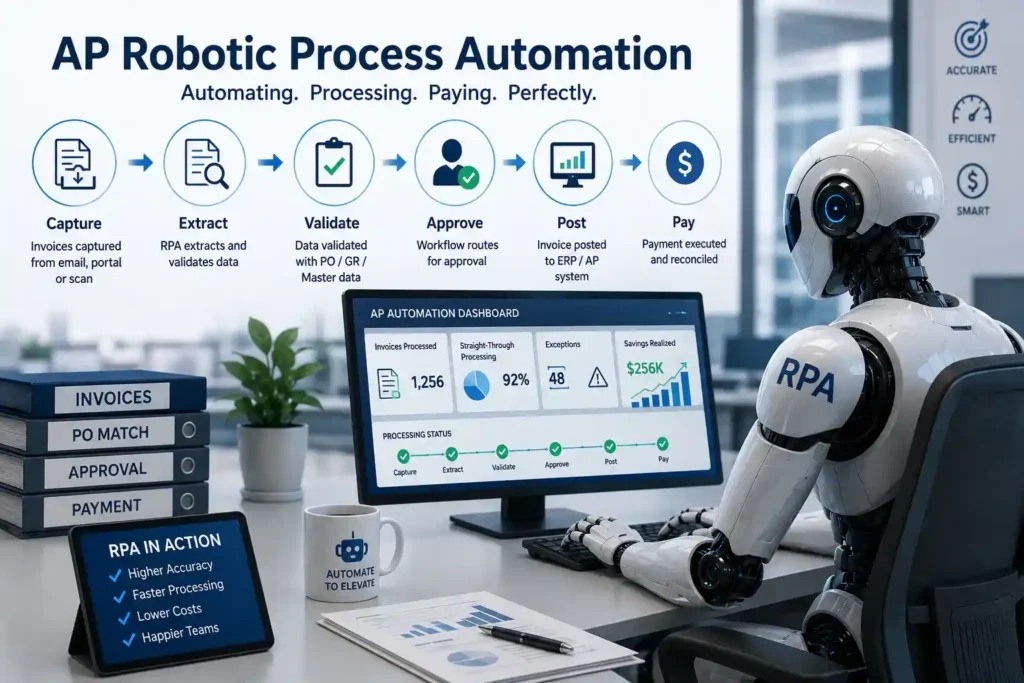
RPA bots perform tasks efficiently and accurately while interacting with existing systems and applications in the same way as human users. Usually, the procedure involves:
- Data Extraction: From sources such as emails, bills, and ERP systems, bots extract both structured and unstructured data.
- Processing & Validation: The extracted data is analyzed, cross-checked for errors, and verified against defined standards.
- Decision-Making: Bots decide whether to approve, escalate, or flag transactions for review using programmed rules.
- Integration with AP Systems: RPA ensures smooth processing and record-keeping by integrating with accounting and ERP software.
Manual AP Processing and Automated AP Workflows
The difference between manual and automated AP processes is clear in cost, speed, accuracy, and workforce efficiency. AP automation helps businesses reduce processing time, minimize errors, and handle higher invoice volumes with less manual effort.
| Metric | Manual AP Processing | AP Automation |
| Cost per invoice | $15–$40 | $1–$3 |
| Processing time | 10–25 days | 1–3 days |
| Error rate | 3–5% | < 0.5% |
| Staff needed (1,000 invoices/mo) | 3–5 FTEs | 0.5 FTE (exceptions only) |
What Are the Steps to Automate Invoice Processing with RPA?
A simple and organized approach makes it much easier to implement RPA for invoice processing. The following are the basic steps to follow:
Step 1: Set the Automation Scope
Determine which AP operations, such as ERP entry, validation, approval routing, and invoice data extraction, require automation. Establish specific objectives, such as decreasing processing time and increasing accuracy.
Step 2: Create the Workflow
Track every step of the invoicing process, from receiving the invoice to posting the payment. Establish system integrations, exception handling, approval processes, and business rules.
Step 3: Create and Evaluate the RPA Bot
Construct the automation gradually and thoroughly test it. Make that the bot can manage integrations with SAP or ERP platforms, as well as validations and exceptions.
Step 4: Implement the Fix
Start an initial rollout of the automation. Employees should be trained, documentation prepared, and implementation support made available.
Step 5: Keep an eye on and improve
Monitor KPIs such as cost savings, error rates, and processing speed. Continually enhance the workflow to accommodate shifting invoice quantities and business requirements.
What Happens After Implementing RPA in AP?
RPA invoice automation not only reduces manual labor but also creates faster, smarter, and more efficient finance operations. Within months, improvements such as faster invoice approvals and better financial analysis are observed.

Here’s what companies should expect after automating their invoice processing:
- Most invoice RPA installations deliver a quick ROI of 6-12 months through reduced manual labor and shorter cycle times, making the investment worthwhile.
- Manual effort reduced by 50-70%: Staff time once spent on data input or chasing permissions may now be devoted to strategic analysis and process oversight.
- Increased staff productivity: Finance teams now have more time to focus on forecasting, vendor negotiations, and compliance, all of which generate real business value.
- Better vendor relationships through timely payments: Prompt, predictable payment cycles build supplier trust, reduce penalties, and strengthen collaborations.
Which RPA Tools Are Best for Invoice Automation?
- UiPath: Known for its robust community support and easy-to-use interface. It provides extensive invoice processing features.
- Automation Anywhere: Offers a cloud-native platform with strong cognitive capabilities, appropriate for complex billing situations.
- Blue Prism: Well-liked by big businesses because to its scalability and strong security features.
- Microsoft Power Automate: Provides both attended and unsupervised automation and integrates easily with other Microsoft applications.
- WorkFusion: Offers sophisticated invoice processing capabilities by fusing RPA, AI, and machine learning.
Wrapping It Up!
Manual AP procedures are expensive, time-consuming, and hard to scale. Businesses may handle invoices more quickly and accurately by using RPA for finance automation. It increases financial visibility, expedites approvals, and minimizes manual labor. By implementing RPA, finance teams can focus on more strategic work rather than routine activities. AP automation is becoming a must for expanding companies.