 Let’s be honest: we’ve all felt the frustration of software that takes forever to update. We’ve all used an app that’s buggy, and the fix seems to take months.
Why does this happen?
In the “old days” (which, in tech, could mean just a few years ago), software was built in silos.
Developers (Dev) would write the code. They were focused on building new features, fast.
Operations (Ops) would manage the servers. They were focused on keeping things stable, which often meant not changing anything.
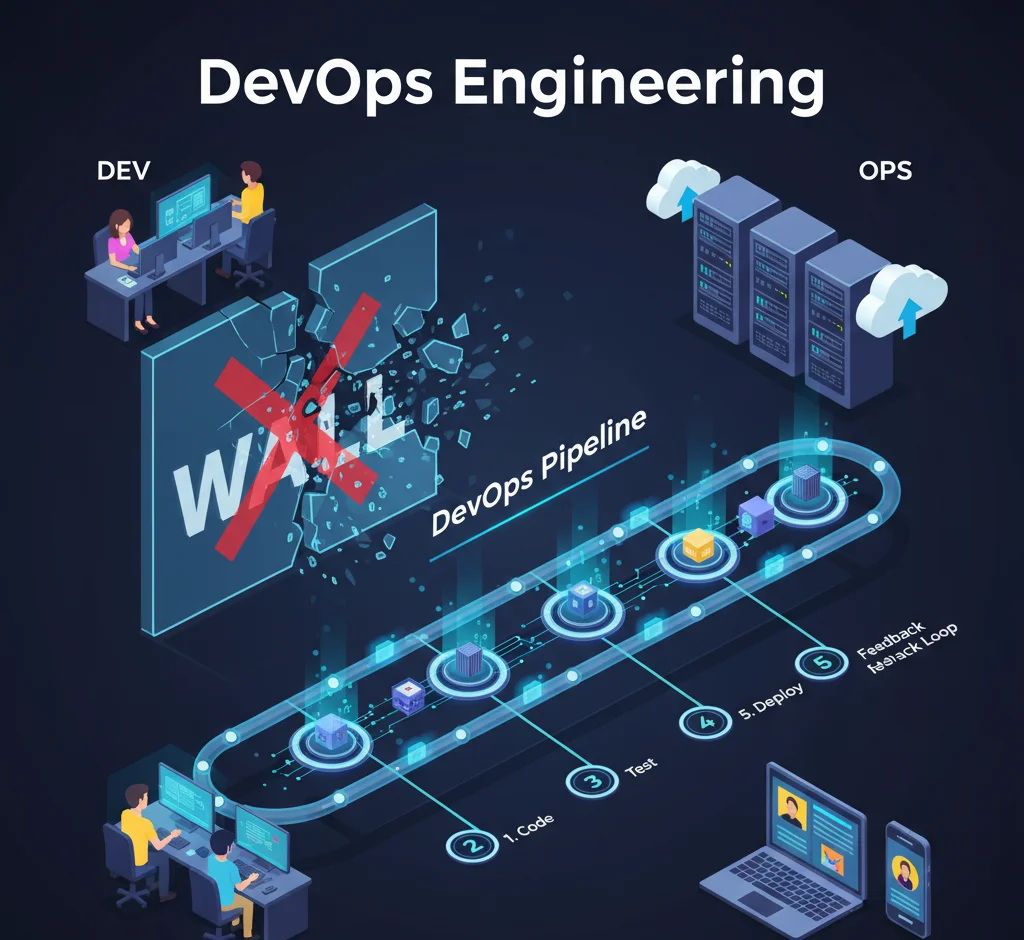
When it was time to release, the Dev team would “throw the code over the wall” to the Ops team. The Ops team, seeing it for the first time, would struggle to get it running. The code would break, developers would say, “It worked on my machine!” and the blame game would begin.
This “wall of confusion” was the single biggest bottleneck in tech. It was slow, expensive, and stressful for everyone.
DevOps Engineering is the solution.
It’s not a magical tool. It’s a new way of thinking. What is DevOps? It’s a culture that tears down that wall, gets Dev and Ops working together, and uses powerful automation to make building, testing, and releasing software fast, safe, and reliable.
As a software house that lives to build amazing things, this is a topic we’re passionate about. So let’s break down What is DevOps Engineering in a simple, human way.
What is DevOps Engineering?
At its heart, DevOps is a cultural shift. It’s about creating a single team (even if they have different titles) that shares one simple goal: to deliver great, working software to users.
Instead of two separate teams with competing priorities (Speed vs. Stability), you have one team that owns the entire process, from the first line of code to the software running in front of a customer.
It's a Culture, Not Just a Job Title
You can’t just “buy DevOps.” You have to build the culture.
Shared Ownership: When a deployment fails, the whole team swarms to fix it. It’s not “their” problem; it’s “our” problem.
Blameless Post-Mortems: When something breaks (and it will), the question is never “Who did this?” It’s “Why did the system let this happen, and how can we automate a fix so it never happens again?”
Collaboration: Developers start thinking about stability. Operations engineers get involved early in the design process. Communication becomes constant.
The Core Goal: Speed and Stability
This is the magic. DevOps proves you don’t have to choose between moving fast and being stable. By automating everything, you remove human error. This allows you to test and deploy code faster than ever, but with more confidence because you know your automated safety nets are in place.
The CAMS Model (A Simple Framework)
A great way to remember the philosophy is CAMS:
Culture: The foundation of it all.
Automation: Automate everything you can. Builds, testing, deployments, server setup… everything.
Measurement: You can’t improve what you don’t measure. How long does a change take? How often do deployments fail? This data is your guide.
Sharing: Share knowledge, share tools, share dashboards. When everyone sees the same information, everyone is on the same page.
How Do You Actually Implement DevOps? A Practical Guide
This all sounds great, but how do you do it? DevOps isn’t a switch you flip. It’s a journey. Here’s a simple, step-by-step guide to starting that journey.
Step 1: Start with the "Why" (and the People)
Before you buy any DevOps Tools, you need to get your team on board.
Find the Pain: Get everyone in a room (or a Zoom call) and ask, “What is the most painful, slowest part of our process?” Is it testing? Is it getting a server ready? Is it the deployment itself?
Get Buy-In: Explain how this new (DevOps) way of working will solve that specific pain. Don’t talk about abstract “synergy”; talk about “no more working at 2 AM on a failed deployment.”
Build Trust: This is a cultural change. Leadership must support the team, encourage experimentation, and adopt that “blameless” mindset.
Step 2: Pick a Pilot Project (Don't Boil the Ocean)
Don’t try to change your entire company overnight.
Start Small: Choose one project. A new application is often perfect, but a small, existing one works too.
Form the Team: Create your first “DevOps” team with a developer, an operations person, and maybe a QA (testing) person. Have them work together on this one project.
Set a Goal: Give them a clear goal, like “Deploy this app with a single click.”
Step 3: Get Your Code in Order (Version Control)
This is the foundation for all automation.
Use Git: Put all your code, and we mean all of it, into a version control system like Git.
Centralize It: Use a platform like GitHub or GitLab. This becomes your single source of truth. Every change is tracked. Every developer is working from the same “master” blueprint.
Step 4: Build Your First "Software Factory" (The CI/CD Pipeline)
This is the big one. You’re going to automate the path from a developer’s keyboard to a live server. This is the DevOps Pipeline, and it’s the most important piece of automation you’ll build. (We’ll explain it in detail in the next section!)
Step 5: Treat Your Servers Like Code (Infrastructure as Code)
Here’s a revolutionary idea: What if you never had to manually log into a server to set it up?
What is IaC? “Infrastructure as Code” (IaC) means you write configuration files (using tools like Terraform) that describe your perfect server setup.
How it Works: Need a new server? You don’t build it. You just run your script. Need 100? Run the script. Need to make a change? You update the code, not the server.
The Benefit: Every server is 100% identical. No more “it worked on my machine.” It’s repeatable, fast, and eliminates human error.
Step 6: Install Your "Dashboard" (Monitoring & Feedback)
You wouldn’t drive a car without a dashboard, right? You need to know your speed, your fuel, and see if the “check engine” light is on.
Instrument Everything: Use tools like Prometheus and Grafana to add monitoring to your app and your servers.
Create Feedback: This data isn’t just for the Ops team. Put those dashboards on a big screen where developers can see them. When a developer pushes new code, they can literally watch its performance in real-time. This creates a powerful, fast feedback loop.
Step 7: Rinse, Learn, and Repeat (Continuous Improvement)
Your first pipeline won’t be perfect. Your monitoring will miss things. That’s okay. The goal of DevOps is not perfection; it’s continuous improvement. Use your CAMS model (Measure!) to find the next bottleneck, and then automate it.
DevOps Pipeline Explained (The Engine of DevOps)
Okay, let’s zoom in on that “software factory,” the DevOps Pipeline. This is the technical heart of What is DevOps CI CD. Think of it as an automated assembly line for your software.
Step 1: The "Commit"
A developer finishes a new feature (say, a new “Contact Us” button). She “commits” (saves) her code changes to the Git repository. This is the “raw materials” arriving at the factory.
Step 2: "Continuous Integration" (CI): The Automated Quality Check
The moment her code arrives, a CI server (like Jenkins or GitLab CI) is automatically notified. It springs into action:
Build: It pulls her new code and “builds” the application.
Test: It runs a whole suite of automated tests—unit tests, integration tests—to make sure her new button didn’t accidentally break the login page or anything else.
Feedback: If the build or tests fail, the pipeline stops and immediately notifies the developer. She can fix the bug in minutes, not weeks. This is the Continuous Integration (CI) loop.
Step 3: "Continuous Delivery" (CD): Ready to Ship
If all tests pass, the CI/CD pipeline continues.
Package: It bundles the new, tested code into a “package.” In the modern world, this is almost always a Docker container (we’ll get to that).
Deploy to Staging: It automatically deploys this package to a “Staging” server—an identical copy of your real, live website.
Final Tests: Here, a final set of automated tests (like “end-to-end” tests) can run to simulate a user clicking around the site.
At this point, the code is fully built, tested, and proven to work. It’s sitting on the “loading dock,” ready to go. This is Continuous Delivery.
Step 4: "Continuous Deployment": Shipping Automatically
Continuous Deployment is the final, optional step. If you’re really confident, you can tell your pipeline: “If it passes all the tests, don’t even ask me. Just deploy it straight to production. This is how companies like Amazon and Netflix deploy changes hundreds or even thousands of times a day.
Step 5: The Feedback Loop (Monitoring)
The code is now live. But the job isn’t done. The monitoring tools we talked about (Step 6) are watching. If they detect a sudden spike in errors, the pipeline can even be configured to automatically roll back the change, keeping your site stable.
The DevOps Toolbox (What We Use to Build It)
You’ve heard a lot of tool names. Let’s simplify them. You don’t need all of these, but they are the most common tools for the job.
The “Blueprint”: Git (GitHub/GitLab)
The “Factory”: Jenkins, GitLab CI, GitHub Actions
The “Shipping Containers”: Docker
What it is: A containerization platform.
Analogy: This is a perfect analogy. Docker lets you package your application and all its dependencies (code, libraries, settings) into a single, sealed “container.”
Why? A Docker container runs exactly the same way on a developer’s laptop, a test server, or in production. It is the fix for “it worked on my machine.”
The “Fleet Manager”: Kubernetes (K8s)
What it is: A container orchestrator.
Analogy: If you have one Docker container, you can manage it. What if you have 1,000? Kubernetes is the “fleet manager” (or traffic cop) that automatically deploys, scales, and heals your containers at a massive scale.
The “Automatic Builder”: Terraform & Ansible
What they are: Infrastructure as Code (IaC) tools.
Analogy: Terraform is like the architect’s script that builds the factory. Ansible is the script that installs all the machines and light fixtures inside it.
The “Cloud Playground”: DevOps Engineering AWS
What it is: A cloud provider like Amazon Web Services (AWS), Azure, or Google Cloud.
Analogy: Instead of buying your own land and building your factory, DevOps Engineering AWS is like renting a state-of-the-art factory where all the tools, power, and security are managed for you. You can spin up a new server (or a whole Kubernetes cluster) with a few clicks or a line of code.
Why This Matters to Your Business
 We just covered a lot of ground. So, let’s bring it back to a simple, human level.
DevOps is the process of building a culture and an automated system that allows you to safely and quickly get your best ideas from your team’s minds to your customers’ hands.
Implementing DevOps Engineering isn’t just a technical upgrade. It’s a business one.
-
You Move Faster: You can release new features weekly or daily, not “next quarter.”
-
You’re More Stable: Your automated testing and monitoring catch bugs before your customers do.
-
You Save Money: You’re not wasting developer time on manual deployments or fixing the same bugs.
-
Your Team is Happier: And this is a big one. Developers get to see their code go live. Ops engineers get to build cool systems, not just fight fires. A happy, empowered team builds better products.